Fauxlographic Etching Lab for MOPA Lasers
The Fauxlographic Etching Lab generates a calibration grid, analyzes a photograph of the engraved grid, and turns selected measurements into fauxlographic swatches in a reusable Fauxlographic Palette. Guests can download the palette file, while signed-in members can save it in Swatch Palette Vault for artwork processing.
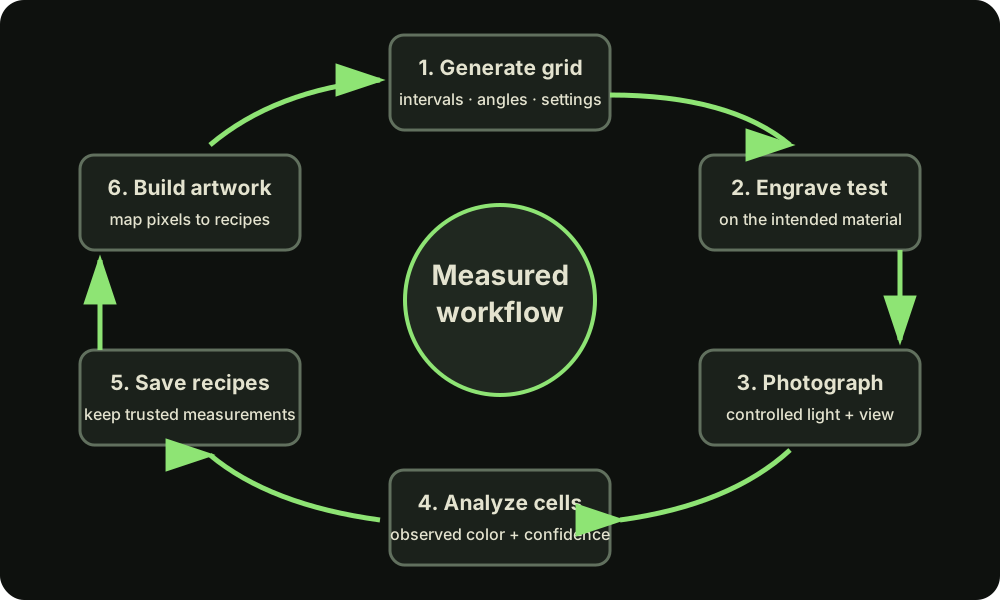
Where to begin
If you already have a tested laser setting that produces an iridescent mark on your material, use that setting as the starting point for calibration. It gives the grid a known, productive foundation while the lab varies grating interval and direction to measure how the appearance changes. If you do not yet have such a setting, first develop a conservative material test that produces a clean, repeatable mark.
The workflow
Generate and engrave a calibration grid; photograph it under a controlled viewing and lighting setup; analyze and review measured cells; then export or save useful fauxlographic swatches as a Fauxlographic Palette.
When the calibration material contains a Cut Setting Entry named Labels, the lab selects it automatically for the calibration identifier. The Labels selector can instead use any setting from the same material; without a Labels entry, the selected calibration setting is the fallback.
Guests can upload a Material Library and complete calibration without an account, but must download and keep the resulting palette file. That file can be uploaded for a guest Fauxlographic Artwork job. Signed-in members can instead save the palette directly to Swatch Palette Vault and select it on Rasterizer without uploading it again.
Why calibration is necessary
Diffraction appearance depends on grating geometry, scan direction, laser parameters, surface, lighting, and viewing angle. A fauxlographic swatch measured in one setup may not reproduce identically in another.
Experimental status
This feature prepares geometry and settings for testing. It does not promise a particular physical color or certify a laser process.