Raster Images to SVG and LightBurn Vector Projects
Rasterizer converts raster artwork in .jpg, .jpeg, .png, .bmp, .tif, .tiff, or .webp format into closed, color-separated vector regions organized by Rasterizer swatch. Every successful job exports the processed geometry as an SVG, while a Material Library-backed job also places that geometry on matched LightBurn layers and exports a .lbrn2 project.
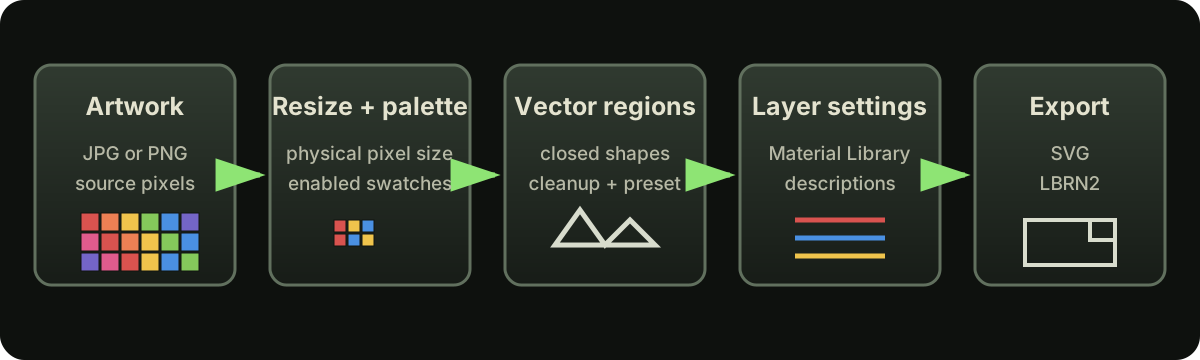
What the conversion does
Rasterizer resizes the image, quantizes its pixels to the available Rasterizer swatches, groups connected swatch colors into regions, and cleans or transforms those regions according to the selected preset before exporting them as vector geometry. In a saved Color Palette job, a swatch is available only when it is enabled and explicitly assigned to a library setting in Swatch Palette Vault. Freshly uploaded guest libraries use matching entry Descriptions instead. SVG-only jobs do not require or apply laser settings.
What to prepare
Prepare a supported raster image, choose the processing width or height and physical pixel size, then enable only the Rasterizer swatches you want represented in the output. A cleaner source image with fewer stray pixels, compression artifacts, and tiny color variations usually produces fewer vector objects and smaller SVG and LightBurn project files.
If you are preparing a Material Library-backed job for the first time, LightBurn's official Material Library guide explains how its libraries, materials, entries, and cut settings are organized.
You can also use Rasterizer's Palette Library Generator to download a blank library populated with disabled UNCONFIGURED entries for the 30 artwork swatches plus Labels and Fauxlographic support entries; add your tested settings, enable output, and remove UNCONFIGURED from each configured entry's Description before use.
Because the generated template already uses Rasterizer's expected material, entry, and swatch structure, you can focus on supplying and testing your laser settings instead of building a compatible library layout from scratch.
What the export preserves
The output represents the processed, palette-mapped color regions as vector shapes rather than preserving the source image's original bitmap pixels. The geometry is organized by swatch so it can be inspected and edited in compatible SVG software or LightBurn, but it remains a processed interpretation rather than a lossless reconstruction of the source artwork.